PIXNET Logo登入

Martin Chang的部落格

跳到主文

歡迎光臨Martin Chang在痞客邦的小天地

部落格全站分類:收藏嗜好

  • 相簿
  • 部落格
  • 留言
  • 名片
  • 2月 21 週四 201921:54
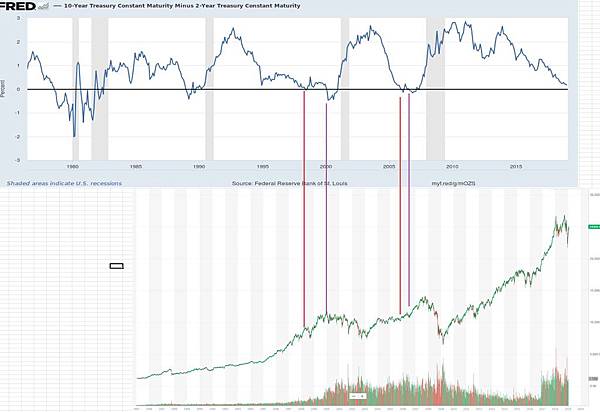
  • 大市方向 02/2019 看美股仍是牛市, HSI 又開始牛市

10 年VS2年.jpg
原因 1. 美市似乎未見大頂
 
(繼續閱讀...)
文章標籤

m1016c 發表在 痞客邦 留言(0) 人氣(172)

  • 個人分類:大市分析
▲top
  • 8月 18 週日 201303:24
  • 取消多远程桌面限制(对所有VISTA版本)

The process consists of the following:

1) Change the termsrv.dll system DLLs. See chapter how.
2) For the Home Premium version, modifying registry keys (which is incorporated Vista Ultimate), we will building us one. Reg. This is only for Vista Home Premium. See the chapter on how to do it.
Once the above points, we proceed to installation. To do this, we must work on a console in elevated mode, ie Start, Accessories, right click on Command Prompt and "Run as Administrator". I guess we have the new and modified dll. Reg in a folder called TMP hanging from c: \
3) We in the console:

cd \ tmp 
net stop "Terminal Services" 
takeown / a / f% SystemRoot% \ System32 \ termsrv.dll 
icacls% SystemRoot% \ System32 \ termsrv.dll / Grant Administrators: F 
(If your version of Windows is the Spanish version, change the line above "Administrators" to "Administrators" 
ren% SystemRoot% \ System32 \ termsrv.dll termsrv.dll. bak 
termsrv.dll copy% SystemRoot% \ System32 \ termsrv.dll


4) If our version is Home Premium, ejecutams the. Reg created in step 2) as follows:

regedit / s ts.reg


5) If we want each user can have separate sessions (ie, if a user is already logged, logging in with another user, instead of taking your session, you create a new clean session), we must incorporate key record we can do as follows:

REG ADD "HKLM \ SYSTEM \ CurrentControlSet \ Control \ Terminal Server" / v fSingleSessionPerUser / t REG_DWORD / d 0 / f


If we turn this feature off at any time and take control of the existing session, we may at any time modify the password again by changing the value 0 to a 1 by:

REG ADD "HKLM \ SYSTEM \ CurrentControlSet \ Control \ Terminal Server" / v fSingleSessionPerUser / t REG_DWORD / d 1 / f


6) Because we do not appear in the Home on the remote connections, the ability to enable remote desktop or not, we do this through a registry key. To activate the Remote Desktop:

REG ADD "HKLM \ SYSTEM \ CurrentControlSet \ Control \ Terminal Server" / v fDenyTSConnections / t REG_DWORD / d 0 / f


and at any time can be disabled by:

REG ADD "HKLM \ SYSTEM \ CurrentControlSet \ Control \ Terminal Server" / v fDenyTSConnections / t REG_DWORD / d 1 / f


7) Start and the service we previously stopped at point 3)

net start "Terminal Services"


(繼續閱讀...)
文章標籤

m1016c 發表在 痞客邦 留言(1) 人氣(293)

  • 個人分類:
▲top
  • 5月 24 週五 201300:36
  • 簡單增加參數將 Chrome 的 Cache 轉移到 RamDisk


http://brilifes.blogspot.tw/2013/03/chrome-cache-ramdisk_13.html
 
 
Google 瀏覽器本身並不直接提供使用者自訂快取空間大小以及資料夾位置的設定, 使用者必須還得透過新增參數在捷徑裡頭才能發揮作

(繼續閱讀...)
文章標籤

m1016c 發表在 痞客邦 留言(1) 人氣(13,969)

  • 個人分類:Software
▲top
  • 5月 16 週四 201322:24
  • DS4700 通過串口修改出廠設置和IP地址

ds4700-1
好像7.0以後的都改了串口連接時的用的口令和密碼
用戶:shellUsr
密碼:wy3oo&w4
串口登錄到控制器,然後執行下面的命令
-> loadDebug
value = 113082072 = 0x6bd7ed8
11/03/10-05:19:26 (tShell0): NOTE: loading flash file: Debug
-> setSAPassword_MT ""
ReturnCode = 0x1
value = 1 = 0x1
-> unld "ffs ebug"
value = 0 = 0x0
(繼續閱讀...)
文章標籤

m1016c 發表在 痞客邦 留言(0) 人氣(1,811)

  • 個人分類:IBM DS
▲top
  • 5月 16 週四 201322:18
  • IBM DS 控制器串口命令文档 dell也一样

 
When you connect to the disk controller using a serial interface port, the controller status is reported as locked.
使用超級終端進行連接,輸入回車,然後Ctrl+Break(有時需要多按幾次),屏幕會出現設置波特率的提示:
Send for shell access or baud rate change
Set baud rate: press within 5 seconds
(繼續閱讀...)
文章標籤

m1016c 發表在 痞客邦 留言(0) 人氣(654)

  • 個人分類:IBM DS
▲top
  • 5月 16 週四 201322:09
  • IBM DS3200 and DS3400 SAN Reset – Syswipe

How to Reset – IBM DS Storage Area Network Appliances. NAS and SAN are becoming the standard for both Datacentres and Business. In the Web Hosting and Remote Storage they are invaluable. The IBM DS3200 range can provide 6gbps transfer rate to server. VALU run DS3200 and the 3400′s for backup and cloning purposes. Time to time we may need to expand the array or create new LUNS, this can be a tricky thing as SAN’s are a beast of their own.
Recently we needed to expand an array from 700GB to 1.4TB, the array build went horribly wrong, the IBM software would not let us delete the old array or logical drives, as we had an exact copy of the SAN data, we decided to reset the IBM DS3200 sub system, this leaves the IP as normal, and allows us to rebuild the arrays correctly.
(繼續閱讀...)
文章標籤

m1016c 發表在 痞客邦 留言(1) 人氣(762)

  • 個人分類:IBM DS
▲top
  • 5月 16 週四 201322:06
  • Clearing a SAN lockdown state

P1000352_thumb
Clearing a SAN lockdown state
 
Hah, are you really bragging that you know how to clear a lockdown at one of California’s finesthotels?
(繼續閱讀...)
文章標籤

m1016c 發表在 痞客邦 留言(0) 人氣(1,470)

  • 個人分類:IBM DS
▲top
  • 5月 16 週四 201322:02
  • IBM Storage DS3512 does not boot: Error: LU & E0

01
AIX, Linux, virtualization and storage
"Patch Management
Brocade / IBM SAN switches model »
DS3512 does not boot: Error: LU & E0 ->lemClearLockdown
(繼續閱讀...)
文章標籤

m1016c 發表在 痞客邦 留言(0) 人氣(1,485)

  • 個人分類:IBM DS
▲top
  • 5月 01 週三 201304:16
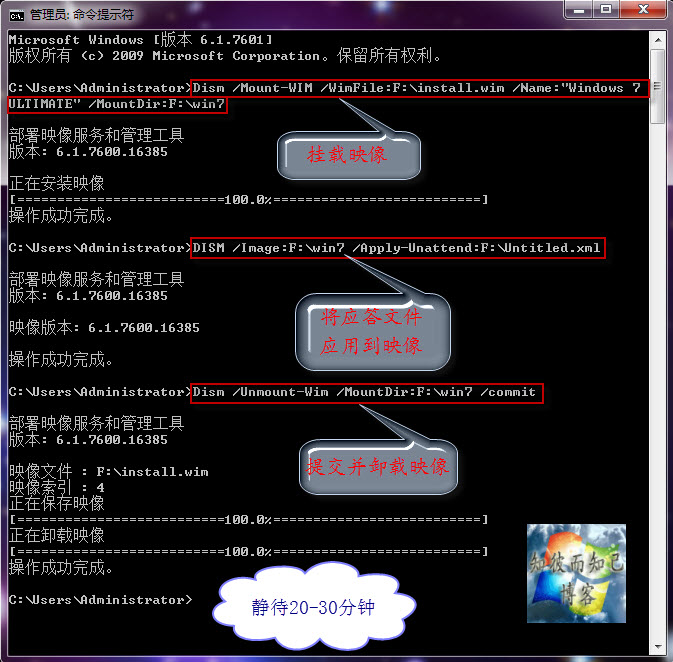
  • 實踐與共享:實現Windows7系統全自動安裝的“無人值守應答文件”及其“使用方法”

f4eb068bd43f8794924d1888d21b0ef41ad53a13
http://hi.baidu.com/zbezj/item/55e3209d50a165d07a7f0155
 

實踐與共享:實現Windows7系統全自動安裝的“無人值守應答文件”及其“使用方法”
(繼續閱讀...)
文章標籤

m1016c 發表在 痞客邦 留言(0) 人氣(5,451)

  • 個人分類:Boot
▲top
  • 5月 01 週三 201304:09
  • 實踐與交流:“$OEM$”在製作OEM版系統中的作用及其配合“應答文件”的使用方法


實踐與交流:“$OEM$”在製作OEM版系統中的作用及其配合“應答文件”的使用方法


    製作OEM版的Windows 7系統,前面介紹過很多次,不管哪種方法都離不開“$OEM$”這個文件夾,“$OEM$”文件夾下通常存在“$$”、“$1”文件夾,在安裝系統的過程時(以系統安裝到C盤為例說明),安裝程序會自動把“$$”文件夾下的所有文件複製到C:\Windows下,將“$1”下的所有文件複製到C盤根目錄。然後安裝程序會自動檢測相應目錄下的OEM證書導入系統,然後導入密鑰、按照“應答文件”及批處理等進行安裝。
   通常“$OEM$”文件夾有三種使用方法:1.集成到boot.wim;2.集成到install.wim;3.直接複製到鏡像的Sources目錄下,這三種方法前面都詳細的講過。現再簡單介紹一下——
 
首先請看之前寫過的OEM版系統製作方法以及應答文件使用:
製作“自動選擇品牌”的OEM版Windows7鏡像
製作“隨機”版(OEM版)的Windows 7鏡像+安裝方法
答疑解惑:回复網友在使用“Windows 7無人值守應答文件”過程中出現的幾個問題
實踐與共享:實現Windows7系統全自動安裝的“無人值守應答文件”及其“使用方法”
 
★集成到Sources目錄下
直接將“$OEM$”文件夾複製到Sources目錄下即可。
★集成到install.wim
 
1.在F盤新建boot文件夾(作為例子),把install.wim複製到f盤根目錄。
2.運行命令imagex /mountrw f:\install.wim 5 f:\boot
——以32位的旗艦版為例
3.將“$$”裡的文件複製到f:\boot\windows下,將“$1”裡的文件複製到f:\boot。
 
4.運行命令imagex /unmount f:\boot /commit
 
★集成到boot.wim
 
1.在F盤新建boot文件夾(作為例子),把boot.wim複製到f盤根目錄
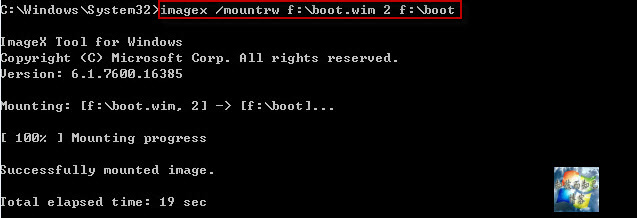
2.運行命令imagex /mountrw f:\boot.wim 2 f:\boot
c0b078d0fd1f413431bee9d1251f95cad3c85ec2  

3.將lenovo文件夾複製到boot文件夾下
4.新建記事本,命名為“winpeshl.ini”,放到f:\boot目錄下的windows\system32目錄下,其內容如下:
 [LaunchApp]
 AppPath = %SYSTEMDRIVE%\sources\setup.exe /unattend:%SYSTEMDRIVE%\lenovo\autounattend.xml
5.運行命令imagex /unmount f:\boot /commit
d5b73bc7b74543a972e616631e178a82bb0114d6  
 
友情提示:本文的三種方法各有優缺點,應視不同情況進行選擇。
-------------------------------------------------- -----------------------------------
(繼續閱讀...)
文章標籤

m1016c 發表在 痞客邦 留言(0) 人氣(931)

  • 個人分類:Boot
▲top
12...8»

參觀人氣

  • 本日人氣:
  • 累積人氣:

個人資訊

m1016c
暱稱:
m1016c
分類:
收藏嗜好
好友:
累積中
地區:

文章分類

  • 大市分析 (1)
  • IBM DS (5)
  • Software (2)
  • Android (2)
  • Windows (23)
  • iSCSI (6)
  • Vbs (5)
  • Boot (8)
  • Linux (22)
  • 未分類文章 (1)

最新文章

  • 大市方向 02/2019 看美股仍是牛市, HSI 又開始牛市
  • 取消多远程桌面限制(对所有VISTA版本)
  • 簡單增加參數將 Chrome 的 Cache 轉移到 RamDisk
  • DS4700 通過串口修改出廠設置和IP地址
  • IBM DS 控制器串口命令文档 dell也一样
  • IBM DS3200 and DS3400 SAN Reset – Syswipe
  • Clearing a SAN lockdown state
  • IBM Storage DS3512 does not boot: Error: LU & E0
  • 實踐與共享:實現Windows7系統全自動安裝的“無人值守應答文件”及其“使用方法”
  • 實踐與交流:“$OEM$”在製作OEM版系統中的作用及其配合“應答文件”的使用方法

熱門文章

  • (13,532)VBS中run和exec的區別
  • (7,995)Lvs(Linux Virtual Server)的基本概念
  • (1,823)在已安裝 XP 系統上裝 intel 的 AHCI driver
  • (1,737)Partimage 硬碟複製/還原軟體
  • (932)在CentOS 5.5系統中安裝VMware Tools
  • (651)製作IBM System Storage DS Storage Manager 10 (Enterprise Management) SMIA-WS32-10.77.35.16.exe Silent Mode 筆記
  • (578) Clonezilla live 1.2.6-24
  • (476)Updating the DMI/SMBIOS data
  • (293)Centos 6 X64 安裝Vmware tools 時遇到問題的筆記
  • (216)Linux SAMBA User mode 筆記

最新留言

  • [21/09/24] 制服愛好者牛排妹 於文章「IBM DS3200 and DS340...」留言:
    感謝大大分享^^...
  • [18/06/20] 奢侈品精仿賣家 於文章「取消多远程桌面限制(对所有VISTA版本...」留言:
    j4C4vJFfaAx3奢侈品仿牌,保固說到做到,誠信經營,...
  • [18/02/22] 訪客 於文章「全手工製作WIN8PE,WIN7PE一條...」留言:
    感謝,確實是長知識的地方。...
  • [16/10/27] 訪客 於文章「Iperf使用說明...」留言:
    感谢分享~!...
  • [13/10/17] 小小燦☆〞 於文章「簡單增加參數將 Chrome 的 Cac...」留言:
    限制快取有時也不好~ mega.co.nz 會因為限制快取...
  • [12/06/10] 小幻 於文章「Linux NAT server 筆記...」留言:
    請問一下,你的對外網路介面是eth0還是eth1? ...
  • [11/12/07] pxhojsdou 於文章「Samsung Galaxy Note ...」留言:
    超便宜又專業的軟體,遊戲...
  • [11/11/02] 訪客 於文章「測試 Dell EqualLogic i...」留言:
    這位大大你寫的storage的文件,寫的真的很好簡單又清楚。...

動態訂閱

文章精選

文章搜尋

誰來我家