PIXNET Logo登入

Martin Chang的部落格

跳到主文

歡迎光臨Martin Chang在痞客邦的小天地

部落格全站分類:收藏嗜好

  • 相簿
  • 部落格
  • 留言
  • 名片
  • 5月 01 週三 201304:16
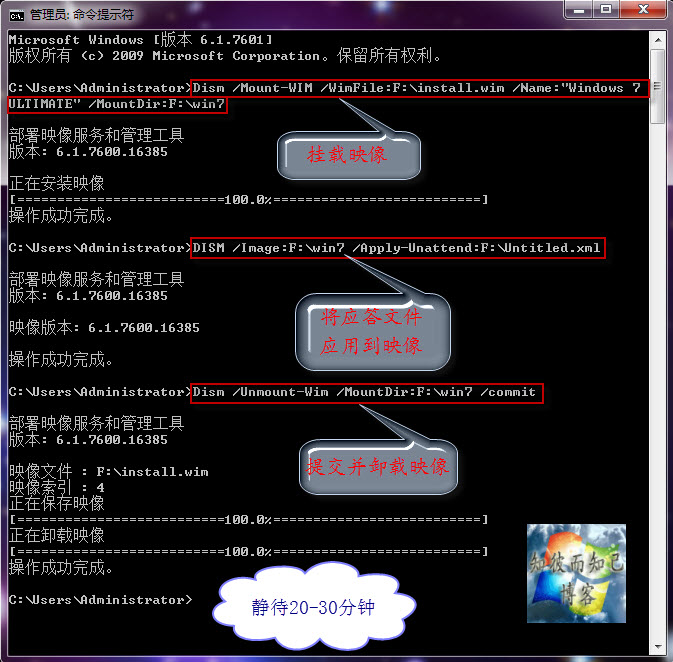
  • 實踐與共享:實現Windows7系統全自動安裝的“無人值守應答文件”及其“使用方法”

f4eb068bd43f8794924d1888d21b0ef41ad53a13
http://hi.baidu.com/zbezj/item/55e3209d50a165d07a7f0155
 

實踐與共享:實現Windows7系統全自動安裝的“無人值守應答文件”及其“使用方法”
(繼續閱讀...)
文章標籤

m1016c 發表在 痞客邦 留言(0) 人氣(5,451)

  • 個人分類:Boot
▲top
  • 5月 01 週三 201304:09
  • 實踐與交流:“$OEM$”在製作OEM版系統中的作用及其配合“應答文件”的使用方法


實踐與交流:“$OEM$”在製作OEM版系統中的作用及其配合“應答文件”的使用方法


    製作OEM版的Windows 7系統,前面介紹過很多次,不管哪種方法都離不開“$OEM$”這個文件夾,“$OEM$”文件夾下通常存在“$$”、“$1”文件夾,在安裝系統的過程時(以系統安裝到C盤為例說明),安裝程序會自動把“$$”文件夾下的所有文件複製到C:\Windows下,將“$1”下的所有文件複製到C盤根目錄。然後安裝程序會自動檢測相應目錄下的OEM證書導入系統,然後導入密鑰、按照“應答文件”及批處理等進行安裝。
   通常“$OEM$”文件夾有三種使用方法:1.集成到boot.wim;2.集成到install.wim;3.直接複製到鏡像的Sources目錄下,這三種方法前面都詳細的講過。現再簡單介紹一下——
 
首先請看之前寫過的OEM版系統製作方法以及應答文件使用:
製作“自動選擇品牌”的OEM版Windows7鏡像
製作“隨機”版(OEM版)的Windows 7鏡像+安裝方法
答疑解惑:回复網友在使用“Windows 7無人值守應答文件”過程中出現的幾個問題
實踐與共享:實現Windows7系統全自動安裝的“無人值守應答文件”及其“使用方法”
 
★集成到Sources目錄下
直接將“$OEM$”文件夾複製到Sources目錄下即可。
★集成到install.wim
 
1.在F盤新建boot文件夾(作為例子),把install.wim複製到f盤根目錄。
2.運行命令imagex /mountrw f:\install.wim 5 f:\boot
——以32位的旗艦版為例
3.將“$$”裡的文件複製到f:\boot\windows下,將“$1”裡的文件複製到f:\boot。
 
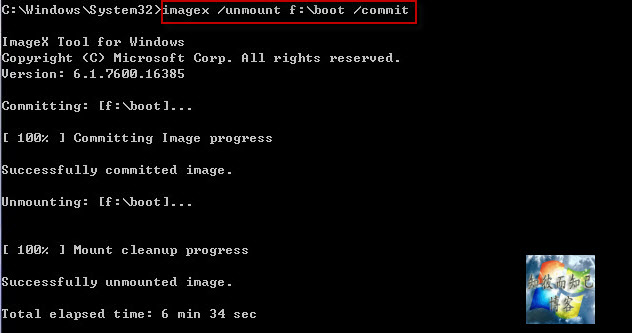
4.運行命令imagex /unmount f:\boot /commit
 
★集成到boot.wim
 
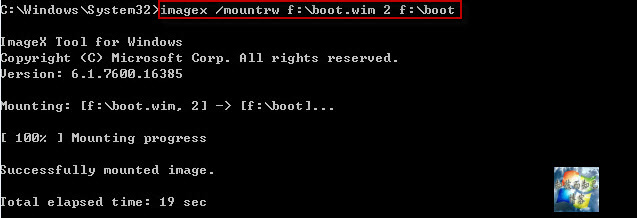
1.在F盤新建boot文件夾(作為例子),把boot.wim複製到f盤根目錄
2.運行命令imagex /mountrw f:\boot.wim 2 f:\boot
c0b078d0fd1f413431bee9d1251f95cad3c85ec2  

3.將lenovo文件夾複製到boot文件夾下
4.新建記事本,命名為“winpeshl.ini”,放到f:\boot目錄下的windows\system32目錄下,其內容如下:
 [LaunchApp]
 AppPath = %SYSTEMDRIVE%\sources\setup.exe /unattend:%SYSTEMDRIVE%\lenovo\autounattend.xml
5.運行命令imagex /unmount f:\boot /commit
d5b73bc7b74543a972e616631e178a82bb0114d6  
 
友情提示:本文的三種方法各有優缺點,應視不同情況進行選擇。
-------------------------------------------------- -----------------------------------
(繼續閱讀...)
文章標籤

m1016c 發表在 痞客邦 留言(0) 人氣(931)

  • 個人分類:Boot
▲top
  • 5月 01 週三 201304:02
  • 實踐與探索:使用虛擬機VMware模擬“UEFI BIOS主板電腦”來安裝Windows 7系統

b2a9e5f9e6cd7b89a3437d110f2442a7d8330ea2
http://hi.baidu.com/zbezj/item/ed1ef5f034a2d0dd43c36a56

實踐與探索:使用虛擬機VMware模擬“UEFI BIOS主板電腦”來安裝Windows 7系統

(繼續閱讀...)
文章標籤

m1016c 發表在 痞客邦 留言(0) 人氣(3,216)

  • 個人分類:Boot
▲top
  • 5月 01 週三 201304:00
  • 電腦及操作系統基本常識(三):“GPT分區方案”與“MBR分區方案”的相互比較

b7ed7d48d11373f0784be50da40f4bfbfaed045a
http://hi.baidu.com/zbezj/item/36fdc90b387b42c82f4c6b56
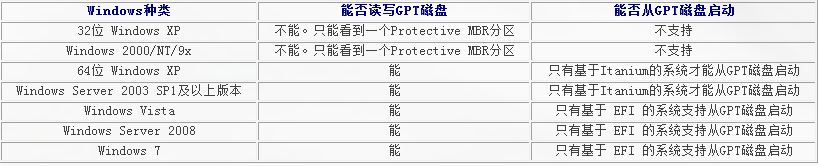
目前的大部分電腦硬盤都是採用“MBR分區方案”,前面詳細介紹過MBR磁盤,現在說一下GPT磁盤。GPT全名Globally Unique Identifier Partition Table Format(GUID分區表),是源於EFI(可擴展固件接口) 使用的磁盤分區架構。現在用最直白的語言說明之——
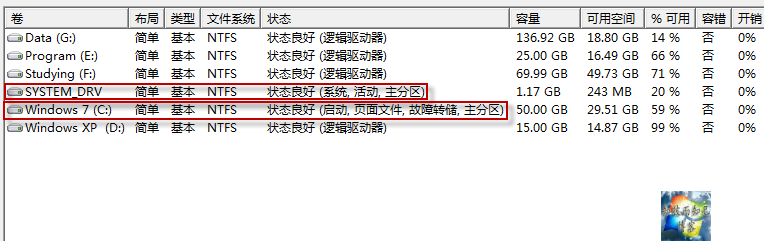
   二者比較: MBR磁盤最多允許存在4個主分區,並且支持磁盤最大容量為2TB;而GPT磁盤最多可允許存在128個主分區(在Windows系統中),支持磁盤的最大容量為18EB(1EB= 1024TB)。每個GPT磁盤都存在Protective MBR,用來防止不能識別GPT分區的磁盤管理工具的破壞。對於Windows系統來說,“GPT分區方案”中的幾個分區:MSR分區、ESP分區。前面提到的Protective MBR,在Windows系統中即為MSR分區,是必須存在的一個分區;ESP分區(非必須存在),是採用UEFI BIOS電腦的系統中,存放啟動文件的分區(當然,還有其他文件)。
(繼續閱讀...)
文章標籤

m1016c 發表在 痞客邦 留言(0) 人氣(8,674)

  • 個人分類:Boot
▲top
  • 5月 01 週三 201303:47
  • 電腦及操作系統基本常識(二):對“傳統BIOS”與“EFI/UEFI BIOS”的基本認識

http://hi.baidu.com/zbezj/item/cb4b2f130859dc04d1d66d56
 

電腦及操作系統基本常識(二):對“傳統BIOS”與“EFI/UEFI BIOS”的基本認識
(繼續閱讀...)
文章標籤

m1016c 發表在 痞客邦 留言(0) 人氣(574)

  • 個人分類:Boot
▲top
  • 5月 01 週三 201303:46
  • 電腦及操作系統基本常識(一):硬盤(MBR磁盤)分區基本認識+Windows啟動原理

f99328dfd100baa1a617560c4710b912c9fc2efb
http://hi.baidu.com/zbezj/item/78da0a46d2bae0ffdd0f6c53

電腦及操作系統基本常識(一):硬盤(MBR磁盤)分區基本認識+Windows啟動原理

(繼續閱讀...)
文章標籤

m1016c 發表在 痞客邦 留言(0) 人氣(1,280)

  • 個人分類:Boot
▲top
  • 4月 25 週四 201322:20
  • 量產U盤打造3合1啟動盤

20130130_1a7d62ac0a84ca58ae7bRlEPwqgjy3o3
第一部分:量產CD-ROM的U啟
    以下是量產過程,可得到一個CD-ROM模式的啟動盤分區——這是最關鍵的部分,剩下的倆分區可以製作其他類型的啟動盤.
(本人的U盤是Kingmax_4G,所以下文以擎泰量產工具為例進行說明,注意:相應的U盤必須採用對應的量產工具,慎重!)
一,準備工作
1.插入U盤,打開Chipgenius,找到所需量產工具的信息,本人的對應量產工具為擎泰SK6213
2.下載工具軟件:SK6213-PDT-20100209A-MAXU(針對本人的Kinmax 4G優盤,用Chipgenius檢測可知)
                         UltraIso-9.3.5(無要求)
二,量產過程:
插入U盤,運行SK6213-MP-TOOL,出現圖SK6213_1:
(繼續閱讀...)
文章標籤

m1016c 發表在 痞客邦 留言(0) 人氣(666)

  • 個人分類:Boot
▲top
  • 10月 25 週二 201117:45
  • WinAoE

http://winaoe.org/


WinAoE


Welcome to WinAoE
WinAoE is an open source GPLv3 driver for using AoE (ATA over Ethernet) on Microsoft Windows(tm).
It can be used to disklessly boot Windows 2000 through Vista 64 from an AoE device (virtual vblade or realCoraid device), or can be used as a general AoE access driver.


How to use WinAoE
Download the latest version below and read the readme.txt file.
For general AoE access it is sufficient to just install the driver (using "Control Panel", "Add Hardware", until I make an installer). After installing you can use the "aoe" command in a command prompt window to mount and unmount AoE drives (type "aoe" for a help screen).


For diskless booting, you also need to set up your network driver to start at boot in the registry (see the readme.txt for that). After this, you can image the drive to a vblade, or put it in a Coraid enclosure and boot over PXE, using either gPXE or the included aoe.0


Read the readme.txt for the latest information.


WARNING!
This is still an experimental driver, although it has been used flawlessly on my own system for the past 2 years (having been put through a few TB of data), it might not work for you!


Important! The 0.97f version implemented a new scheduler which appeared to be very slow. 0.97g fixes this. To update, copy the aoe32/64.sys to C:\Windows\system32\drivers and aoe.exe to C:\Windows\system32 and reboot. For questions feel free to visit the IRC channel.
Download: winaoe-0.97g.zip  (older versions)


More information and how to contact me
For more information and to contact me, the preferred method is IRC, the #etherboot channel on the FreenodeIRC network. You can also reach me through this contact form (I don't post email addresses online), although I will only reply if it is absolutely necessary.


As a last note, if you would like to contribute patches to this driver, I only accept patches which are released under the public domain. Include a small header releasing the patch as public domain in order to do that. This is so that I would be able to relicense the driver for specific usage if the situation of some company demands that.
That being said, the driver itself will always be available through GPL, as that is the primary release license.


If you would like to contribute in any other way, please visit the irc channel or use the contact form.


Some useful links to helpful people and software


Etherboot/gPXE by Marty Connor (mdc) & Michael Brown (mcb30).
 The etherboot project is being used by lots of people to netboot systems all over the world.
The new and brilliant gPXE loader expands on the foundation of etherboot by adding in things like booting over http, booting over iSCSI and of course booting over AoE.
Thanks in general to mdc for the incentive to release this driver and generally keeping a good mood, and mcb30 for debugging and making gPXE compatible with booting Windows over AoE.
SYSLINUX by H. Peter Anvin (hpa).
 SYSLINUX is a very nice piece of work to boot a host of different systems.
It includes PXELINUX which can be used to make a PXE enabled boot menu, usable together with gPXE or WinAoE to choose between booting Windows or Linux over the network.
Also a general thanks for hpa with pointers and debugging.
Coraid.
 The inventors of AoE. They helped to make the release of this driver possible.
Do not contact them for support though, see above.

And lastly I want to thank my alpha/beta testers to find new and exciting bugs to fix! (you know who you are).


— V.


(繼續閱讀...)
文章標籤

m1016c 發表在 痞客邦 留言(0) 人氣(137)

  • 個人分類:Boot
▲top
1

參觀人氣

  • 本日人氣:
  • 累積人氣:

個人資訊

m1016c
暱稱:
m1016c
分類:
收藏嗜好
好友:
累積中
地區:

文章分類

  • 大市分析 (1)
  • IBM DS (5)
  • Software (2)
  • Android (2)
  • Windows (23)
  • iSCSI (6)
  • Vbs (5)
  • Boot (8)
  • Linux (22)
  • 未分類文章 (1)

最新文章

  • 大市方向 02/2019 看美股仍是牛市, HSI 又開始牛市
  • 取消多远程桌面限制(对所有VISTA版本)
  • 簡單增加參數將 Chrome 的 Cache 轉移到 RamDisk
  • DS4700 通過串口修改出廠設置和IP地址
  • IBM DS 控制器串口命令文档 dell也一样
  • IBM DS3200 and DS3400 SAN Reset – Syswipe
  • Clearing a SAN lockdown state
  • IBM Storage DS3512 does not boot: Error: LU & E0
  • 實踐與共享:實現Windows7系統全自動安裝的“無人值守應答文件”及其“使用方法”
  • 實踐與交流:“$OEM$”在製作OEM版系統中的作用及其配合“應答文件”的使用方法

熱門文章

  • (13,532)VBS中run和exec的區別
  • (7,995)Lvs(Linux Virtual Server)的基本概念
  • (1,823)在已安裝 XP 系統上裝 intel 的 AHCI driver
  • (1,737)Partimage 硬碟複製/還原軟體
  • (932)在CentOS 5.5系統中安裝VMware Tools
  • (651)製作IBM System Storage DS Storage Manager 10 (Enterprise Management) SMIA-WS32-10.77.35.16.exe Silent Mode 筆記
  • (578) Clonezilla live 1.2.6-24
  • (476)Updating the DMI/SMBIOS data
  • (293)Centos 6 X64 安裝Vmware tools 時遇到問題的筆記
  • (216)Linux SAMBA User mode 筆記

最新留言

  • [21/09/24] 制服愛好者牛排妹 於文章「IBM DS3200 and DS340...」留言:
    感謝大大分享^^...
  • [18/06/20] 奢侈品精仿賣家 於文章「取消多远程桌面限制(对所有VISTA版本...」留言:
    j4C4vJFfaAx3奢侈品仿牌,保固說到做到,誠信經營,...
  • [18/02/22] 訪客 於文章「全手工製作WIN8PE,WIN7PE一條...」留言:
    感謝,確實是長知識的地方。...
  • [16/10/27] 訪客 於文章「Iperf使用說明...」留言:
    感谢分享~!...
  • [13/10/17] 小小燦☆〞 於文章「簡單增加參數將 Chrome 的 Cac...」留言:
    限制快取有時也不好~ mega.co.nz 會因為限制快取...
  • [12/06/10] 小幻 於文章「Linux NAT server 筆記...」留言:
    請問一下,你的對外網路介面是eth0還是eth1? ...
  • [11/12/07] pxhojsdou 於文章「Samsung Galaxy Note ...」留言:
    超便宜又專業的軟體,遊戲...
  • [11/11/02] 訪客 於文章「測試 Dell EqualLogic i...」留言:
    這位大大你寫的storage的文件,寫的真的很好簡單又清楚。...

動態訂閱

文章精選

文章搜尋

誰來我家