10 年VS2年.jpg

原因 1. 美市似乎未見大頂

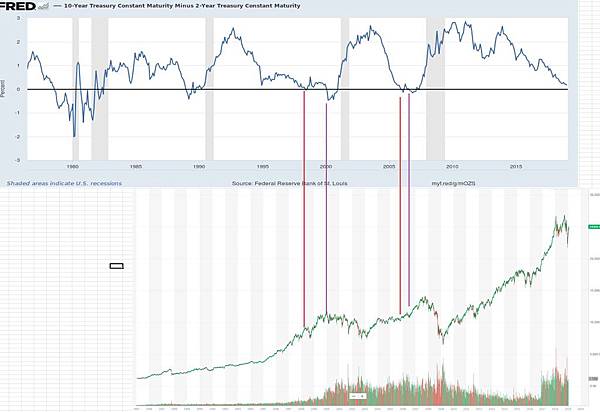
圖為10 年期和2 年期美債 和 DJI 的對比圖
1988-2000 年牛市中, 出現 第一次10 年和2 年美債相差變成負數(紅線) 約於1998 年, 之後再升多2 年, 出現第二次相差變成負數(紫線), 約於2000 年 美股才見頂
2002-2007 年牛市中, 第一次負數(紅線)出現在2005 年, 出現第二次負數(紫線)約於2006 年, 之後大市再升到2007 年年尾才見頂
現在美股, 10 年期和2 年期美債還未出現第一次負數, 由2000 年和2007 年牛市見到, 在第一次負數之後, 還可以升多2 年, 創新高, 之後才見頂

m1016c 發表在 痞客邦 留言(0) 人氣()

The process consists of the following:

1) Change the termsrv.dll system DLLs. See chapter how.


2) For the Home Premium version, modifying registry keys (which is incorporated Vista Ultimate), we will building us one. Reg. This is only for Vista Home Premium. See the chapter on how to do it.


Once the above points, we proceed to installation. To do this, we must work on a console in elevated mode, ie Start, Accessories, right click on Command Prompt and "Run as Administrator". I guess we have the new and modified dll. Reg in a folder called TMP hanging from c: \


3) We in the console:

m1016c 發表在 痞客邦 留言(1) 人氣()


http://brilifes.blogspot.tw/2013/03/chrome-cache-ramdisk_13.html

Google 瀏覽器本身並不直接提供使用者自訂快取空間大小以及資料夾位置的設定, 使用者必須還得透過新增參數在捷徑裡頭才能發揮作

參數名稱

m1016c 發表在 痞客邦 留言(1) 人氣()

ds4700-1

好像7.0以後的都改了串口連接時的用的口令和密碼
用戶:shellUsr
密碼:wy3oo&w4

串口登錄到控制器,然後執行下面的命令
-> loadDebug

m1016c 發表在 痞客邦 留言(0) 人氣()

When you connect to the disk controller using a serial interface port, the controller status is reported as locked.

使用超級終端進行連接,輸入回車,然後Ctrl+Break(有時需要多按幾次),屏幕會出現設置波特率的提示:
Send for shell access or baud rate change
Set baud rate: press within 5 seconds

按空格Space設定波特率,屏幕會出現波特率已經設置成功的提示:

m1016c 發表在 痞客邦 留言(0) 人氣()

How to Reset – IBM DS Storage Area Network Appliances. NAS and SAN are becoming the standard for both Datacentres and Business. In the Web Hosting and Remote Storage they are invaluable. The IBM DS3200 range can provide 6gbps transfer rate to server. VALU run DS3200 and the 3400′s for backup and cloning purposes. Time to time we may need to expand the array or create new LUNS, this can be a tricky thing as SAN’s are a beast of their own.

Recently we needed to expand an array from 700GB to 1.4TB, the array build went horribly wrong, the IBM software would not let us delete the old array or logical drives, as we had an exact copy of the SAN data, we decided to reset the IBM DS3200 sub system, this leaves the IP as normal, and allows us to rebuild the arrays correctly.

The option RESET is not available in the storage manager, yet, in the storage manager for the DS4000-series this was available.

To reset a DS4000-series use the command sysWipe on both controllers and sysReboot afterwards, these commands are done through the serial port.

1. Login into the serial port shell of the controller.

m1016c 發表在 痞客邦 留言(1) 人氣()

P1000352_thumb

Clearing a SAN lockdown state

Hah, are you really bragging that you know how to clear a lockdown at one of California’s finesthotels?

No… Just No, I think that would involve blackmailing the governator or some mild kidnapping both are way beyond my ability to pull off.

Is this something to do with restoring operation of a faulty biological SAN/pacemaker?

As much as I enjoyed biology in A level that would also be beyond my knowledge and this is a computer orientated blog.

m1016c 發表在 痞客邦 留言(0) 人氣()

01

AIX, Linux, virtualization and storage

"Patch Management

Brocade / IBM SAN switches model »

DS3512 does not boot: Error: LU & E0 ->lemClearLockdown

last week failed a DS3512 when an expansion connected through SAS

m1016c 發表在 痞客邦 留言(0) 人氣()

f4eb068bd43f8794924d1888d21b0ef41ad53a13

http://hi.baidu.com/zbezj/item/55e3209d50a165d07a7f0155

實踐與共享:實現Windows7系統全自動安裝的“無人值守應答文件”及其“使用方法”

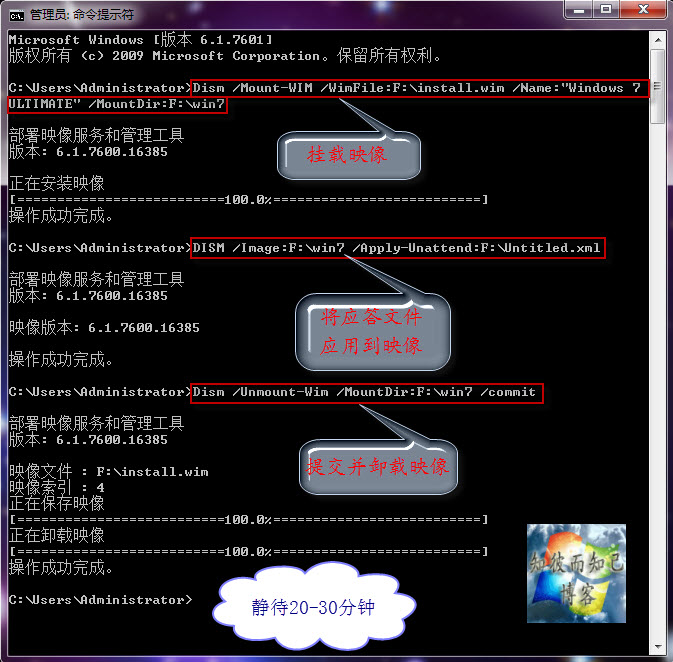
   前面在封裝Windows7的教程中寫過“無人值守文件”的具體製作、使用方法(介紹了2種),今天再來強調一下具體用法(又新加2種)。所謂“無人值守”就是在安裝時的相關設置操作全部自動化。但是為了使之更具普遍適用性,安裝過程中“安裝分區的選擇”需要自己動手來執行,其他操作完全自動完成。說到底都是通過一個名為“AutoUnattend.xml”的文件起作用,即無人值守應答文件。

m1016c 發表在 痞客邦 留言(0) 人氣()

c0b078d0fd1f413431bee9d1251f95cad3c85ec2

實踐與交流:“$OEM$”在製作OEM版系統中的作用及其配合“應答文件”的使用方法

    製作OEM版的Windows 7系統,前面介紹過很多次,不管哪種方法都離不開“$OEM$”這個文件夾,“$OEM$”文件夾下通常存在“$$”、“$1”文件夾,在安裝系統的過程時(以系統安裝到C盤為例說明),安裝程序會自動把“$$”文件夾下的所有文件複製到C:\Windows下,將“$1”下的所有文件複製到C盤根目錄。然後安裝程序會自動檢測相應目錄下的OEM證書導入系統,然後導入密鑰、按照“應答文件”及批處理等進行安裝。


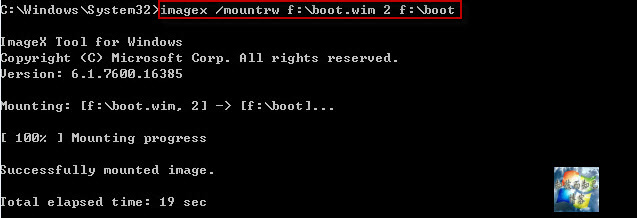
   通常“$OEM$”文件夾有三種使用方法:1.集成到boot.wim;2.集成到install.wim;3.直接複製到鏡像的Sources目錄下,這三種方法前面都詳細的講過。現再簡單介紹一下——

m1016c 發表在 痞客邦 留言(0) 人氣()

http://hi.baidu.com/zbezj/item/1104cd9afdbdadd71e427156

推薦下載使用:“單一可執行的綠色軟件”製作工具Cameyo最新版+簡明使用方法

 Cameyo是一款可以製作綠色軟件的工具,運行Cameyo後會自動創建一個系統的“快照”,然後安裝應用軟件後會再次創建一個系統“快照”,最後打包成單一可執行的EXE程序。

官方網站:http://www.cameyo.com/index.aspx

官方下載:http://www.cameyo.com/downloads/Cameyo-2.0.831.exe

m1016c 發表在 痞客邦 留言(0) 人氣()

b2a9e5f9e6cd7b89a3437d110f2442a7d8330ea2

http://hi.baidu.com/zbezj/item/ed1ef5f034a2d0dd43c36a56

實踐與探索:使用虛擬機VMware模擬“UEFI BIOS主板電腦”來安裝Windows 7系統

   新一代的電腦主板中採用了UEFI BIOS,但畢竟這樣的電腦是少數。至於這樣的電腦日後是否會“普及”暫且不論,但是作為一項新技術,對於DIY愛好者來說,有必要探索一番。VMware8.0.2及其以上版本可以簡單的模擬“UEFI BIOS主板電腦”,對於何為“UEFI BIOS”昨天做過介紹。下面介紹一下操作方法。

m1016c 發表在 痞客邦 留言(0) 人氣()

Blog Stats
⚠️

成人內容提醒

本部落格內容僅限年滿十八歲者瀏覽。
若您未滿十八歲,請立即離開。

已滿十八歲者,亦請勿將內容提供給未成年人士。